When selling online, quality photographs and video are important so that the item looks good. This month, I sold some old equipment on eBay. Most are items that are in good condition but I haven’t used in years. One item was a camera lens, a lens for Canon EF mount that I have replaced with Canon RF equivalent.
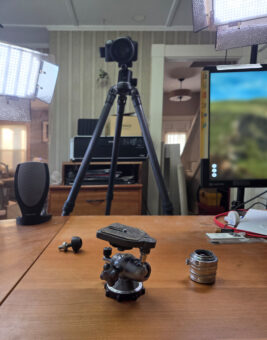
The photo here shows how I made my photos for eBay. I don’t have studio space for such photography; this is my everyday desk. I pushed my computer monitor off to the side and setup two LED lights.
If you are making photographs, not video, you might use flash/strobe lights. If you’re shooting video, then you need constant-ON lights. I use the same lights for both; not using flash. Because the light has a slight blue cast, I use a slight orange filter over the light to correct it; alternatively, color can also be corrected in post-processing.
In the specific case of this old ballhead, it has moving parts and an interested person sent me a question, asking if the movement was smooth. To answer the question, I shot a quick video and added it to the auction listing. (Video is not always necessary, but it can be.) As I need to have hands on the item I was demonstrating, that means I can’t have hands on the camera; either the camera needs to be on a support (tripod) or enlist the help of someone nearby.
Before uploading images to eBay, I intentionally resize them according to eBay guidelines. If I understood correctly, eBay recommends that the longer edge of the image should be 1600 pixels. Video can be up to 1080p, but I resized my video as 720p.
Having sold a few items … I used that money to buy another lens. (I’m not earning money by selling a few things online.) Buying used photography gear online can be a bit more challenging than selling.